Meta / Contents
I Built My Own Claude Tag
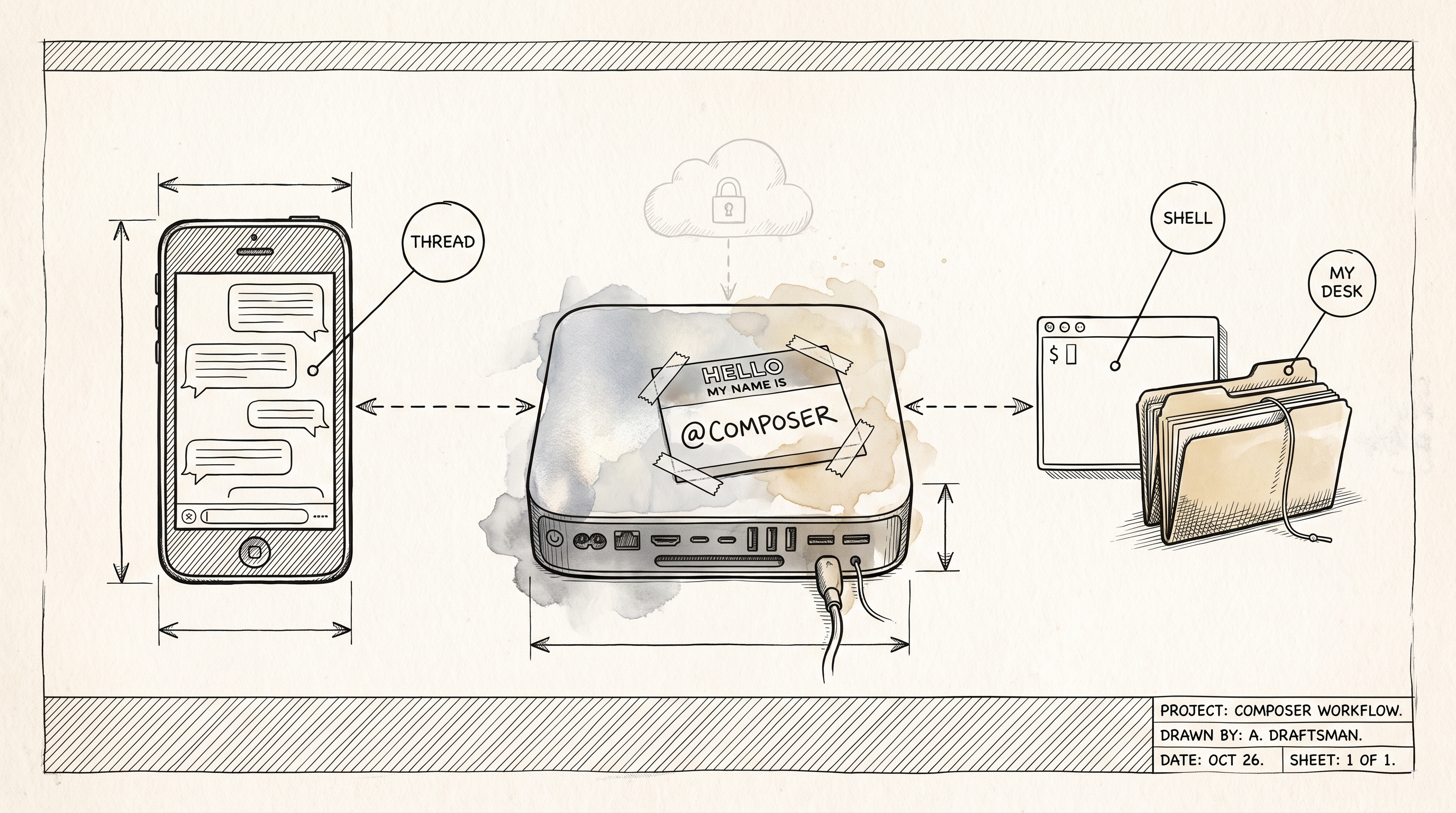
Anthropic put Claude in Slack. I already had Claude running on a Mac mini with my tools, my checkouts, and my task queue, so I gave that one a Slack handle instead. Now I @mention composer with anything, it remembers the thread, and this week it talked me through my own stale rule before pulling a repo.
The tag that made me jealous
Anthropic put Claude in Slack. They call it Claude Tag, and it's Claude as a member of your Slack workspace. You @mention it in a channel, it spins up a sandbox in Anthropic's cloud, reads the thread, does the work, and keeps the context for as long as the thread lives. DMs work too. It's a good product. It's also Team and Enterprise only, and by design it never touches a machine you own.
I read the docs with the specific envy of someone who already had most of the parts. I run Claude Code on a Mac mini all day through Composer, the agent platform I wrote about in March, and Composer already had a Slack bot. It posted a thread per task, told me when a PR merged, and answered three slash commands. That was the whole relationship. Status out, nothing in.
I already have Claude on my desk with my tools, my checkouts, and my task queue. Why can't I tag mine?
That question became the spec.
What composer could do before
The old bot was a status feed with a command line bolted on. Every task got its own thread in #composer-tasks: created, started, PR opened, review verdict, merged. Three slash commands let me create a task, list them, or check quota. There was also a small DM grammar, things like create task for leaderboard-fantasy: ... and list tasks, that I had written docs for and used maybe twice.
Here's the part I only learned this week. The Slack app had never had event subscriptions switched on. Slash commands don't need them, so those worked. DMs do, so not one DM had ever reached the bot. The command grammar was dead the entire time, and nobody, me included, noticed.
Keep that in mind for later. It's the kind of thing you find when you finally ask the bot a question and wait.
Now: @composer, anything
Today I can @mention composer in any channel it's in, or DM it in plain English, and it answers under my message in a thread. Reply in that thread and it picks up where it left off. The thread is the memory. Behind Slack, each one is a conversation row in Composer's database that resumes the same Claude session every turn, and the same transcript shows up in the web app if I'd rather continue there.
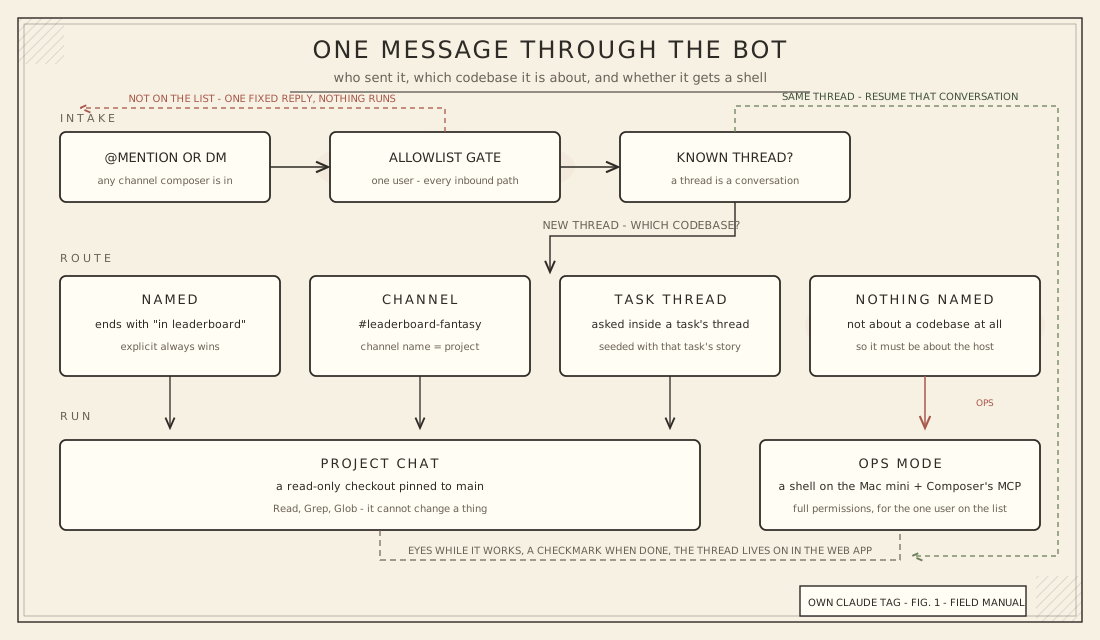
The only real decision on every message is which codebase it's about, and the rules are short:
- If I end with
in leaderboard-fantasy, that wins. - If the channel is named after a project, it's about that project.
- If I ask inside a task's notification thread, it's about that task's project, and the first turn gets the task's story stapled to it: id, status, prompt, PR number, last error. "Why did this fail?" finally works where the failure was announced.
- If none of those match, it's not about a codebase. It's about the host. That's ops mode, and it gets a shell.
Project chats run in a read-only checkout pinned to main, with nothing but read, grep, and glob. They can't change a thing. Ops mode runs on the mini as the same user the dashboard runs as, with Composer's own MCP server attached so it can see the queue, the chains, and the quota.
My first test was the one everyone does.
me: @composer what time is it?
(eyes reaction appears on my message)
composer: 4:27 PM Eastern on the mini. Anything else?
(eyes swap for a checkmark)
Not impressive. Very satisfying. The reactions were a late addition to the spec and they're the detail I'd fight hardest to keep. A message that gets eyes is a message that was heard.
The exchange that sold me
The second test had a real job behind it. That morning, Composer's nightly checkout sync had reported the Leaderboard project as behind, and I wanted it current before the day's tasks ran. Paraphrasing the thread:
me: @composer can you pull the latest leaderboard codebase please?
composer: The checkout is two commits behind origin/main, clean tree, nothing local. I stopped short of pulling, and here's why. My standing instruction says checkouts are advanced by the nightly sync script and I should never touch them directly. That script doesn't sync projects anymore. The job moved into the dashboard's own checkout worker, which runs at 5 AM, fast-forwards clean repos, and skips any project with active tasks. There's no on-demand trigger for it.
So the sanctioned path is nightly only, and pulling now means doing the one thing I'm told not to do. Two options: I run a fetch and fast-forward merge myself, which is exactly what the worker would do for a clean repo that's cleanly behind, or we leave it for tonight.
Also: my ops instructions are stale on this point. Want me to open an issue for a manual sync trigger?
me: Option 1 please.
composer: Done. Fast-forwarded to the tip of origin/main, tree clean. I checked first that no tasks were running on the project, mirroring the worker's rule. Two commits came in, both on the contest roster-lock feature, plus two new remote branches. The stale instruction is still open if you want that issue.
Read that middle message again. It knew the house rule. It found out the rule pointed at a script that no longer did the job, by reading the server code that replaced it. It stopped, explained, gave me two options with the trade-off stated, and offered to file the follow-up. When I picked one, it copied the safety check from the worker it was standing in for before it touched anything.
That's the moment I decided the shell was worth it. Speed didn't earn the trust. An assistant that argues with its own instructions, politely, and then waits, did.
The issue got filed, by the way. It was right.
Local tools, local data
This is where mine and Anthropic's part ways, and it's the whole reason I built it instead of waiting for a plan I could buy.
Claude Tag runs in a sandbox Anthropic owns. It reaches your systems through connections an admin configures, and it acts under its own service accounts. That's the right design for a team. It's also a design where the work happens somewhere else and the memory of it lives somewhere else.
Mine runs on the box under my desk. Ops mode has the same shell I'd have if I SSH'd in. It has the project checkouts the nightly job maintains, the same SQLite database the dashboard reads, and one MCP server, my own, on purpose. I've written before about the cost of attaching every MCP server you can find. This one earns its place because it's the only way to ask about the queue without reading the database by hand.
Every conversation is a row in a database I back up. Every transcript is mine to grep. The fashionable word for this is sovereignty, which sounds grander than "the files are on my Mac," but that is what it means.
I want to be honest about the limit. The model is still Anthropic's. The tokens still leave the building. What's local is the tools, the data, and the memory, and those are the parts that make an assistant useful for my work rather than work in general. If a local model ever gets good enough to swap in, nothing on the Slack side would change. That's not why I built it, but it's a nice property to have on the shelf.
What it took to hand a Slack message a shell
Giving a chat message a terminal on a production host is the sort of thing you should be able to explain in one paragraph. Here's mine.
There's an allowlist, and it has one name on it. It gates every inbound path, the old ones included: mentions, DMs, thread replies, slash commands, even the merge reply that releases a held PR. Anyone else gets one fixed sentence and nothing runs. Identity comes from Slack's own user lookup against my email, so the list reads like a list of people, not opaque IDs.
For that one user, ops turns run with permission prompts bypassed and no tool restrictions. I thought about a curated allowed-tools list and decided it would be theater. If I'm going to ask it to upgrade Homebrew packages, a list that permits brew but forbids rm isn't a boundary, it's a suggestion. The real boundary is who can talk to it. The bet is on the person, not the model.
Two smaller things. The MCP token is written to a file only that user can read, never passed on the command line where any process listing could see it. There's a settings toggle that turns ops mode off without touching the allowlist, because the day I want it off will not be a day I want to think carefully.
Project chats stay read-only regardless. The shell is only ever offered to a message that's about the host.
How it got built
I don't want to bury this in detail, but I do want to say it plainly, because it's how I work now.
I described the idea to my agent in one sitting. It read the bot's code, told me what existed, and interviewed me on the decisions: who can talk to it, what happens when no project is named, whether a Slack message may run commands. Those answers became five GitHub issues with exact contracts, written the way I spec things for agents. Then I handed the issues to Composer as a chain, one PR at a time.
The five PRs merged within an hour of each other, the same afternoon. While the chain ran, we opened the Slack app's config together and found the event subscriptions had never been on. Fixed that too.
Spec with the agent and my skills, hand off to the factory, come back to a working feature. It's a formula. This post is the latest thing it produced.
Where this goes
The first week of asks will be boring in the best way. Disk and memory on the mini. Whether the nightly sync went clean. Upgrade the brew packages and tell me what changed. "Why did this fail?" typed into the thread where it failed.
The on-demand checkout sync it asked for is already an issue in the queue, and I expect it to be built by the same factory that flagged it. After that, I'd like the ops preamble to stop describing a script that doesn't exist, which is a sentence I never expected to write about my own infrastructure.
Anthropic built Claude Tag for teams. I built mine for one person with a Mac mini and a habit of typing into Slack from the couch. Both are the same bet: the assistant should live where the work already happens. Mine just happens to live at home.
–Jeremy